Download Link Click Here
Download Tool Setup Click Here
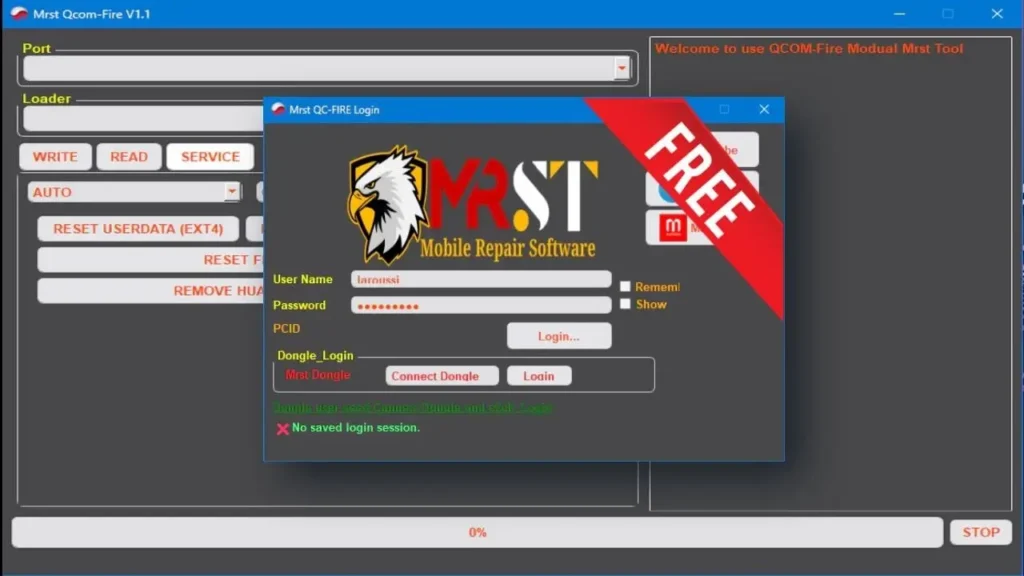
Here You Can Download MRST QC Tool v1.1 For Free, And I Will Step by Step Guide You On How To Install MRST QC Tool On Your Computer.
MRST QC Tool v1.1 comes with a new Auto Method for Oppo and Realme devices — just connect and unlock, no key combos required. It works fast and stable on chipsets like SDM 665, 710/712, and 730, tested on models such as Oppo A5/A9 2020, A72, A92, and Realme 5, X2, Narzo 20A.
The tool now has a dark theme, model images, and verified tags for smoother use. It’s free to use, and you can generate your own activation key for lifetime access — no renewals or hidden charges.
MRST QC Tool v1.1 Released
- New Feature: Oppo/Realme Auto Method
- 100% Auto Qualcomm Unlock
- No key combo – just connect & go
- Fast, stable, and easy-to-use
Supported Chipsets
- SDM 665
- SDM 710 / 712
- SDM 730
Tested Models Oppo
- A5 2020, A9 2020, A11X, A72, A92
- Realme: 5, 5i, 5s, X2, Narzo 20A
UI Upgrades
- Modern dark theme
- Model images
- “Tested” tags for verified devices
Plug. Select. Done.
- No yearly renewals – lifetime access!
MRST QC Tool Features
Port & Loader
- Select communication Port
- Load Loader file
- Buttons: WRITE, READ, SERVICE
Firmware & Partition
- Firmware dropdown
- Partition table:
- Partitions
- Filename
- Start Addr
- End Addr
- Size
- Oppo Checksum checkbox
- FLASH button
Service Options
- RESET USERDATA (EXT4)
- RESET USERDATA (MISC)
- RESET FRP
- REMOVE HUAWEI ID
Backup Section
- Backup dropdown
- WRITE and READ buttons
Control Panel
- FORMAT
- READ
- DETECT
- STOP
Download Link
Username: 👉 softwarecrackguru
Password: 👉 112233
File Password 👉 softwarecrackguru
Watch This Video For Installation Method 👇

Leave a Comment