⚠️ Warning: Download and use at your own risk. We are not responsible for any issues or damage.
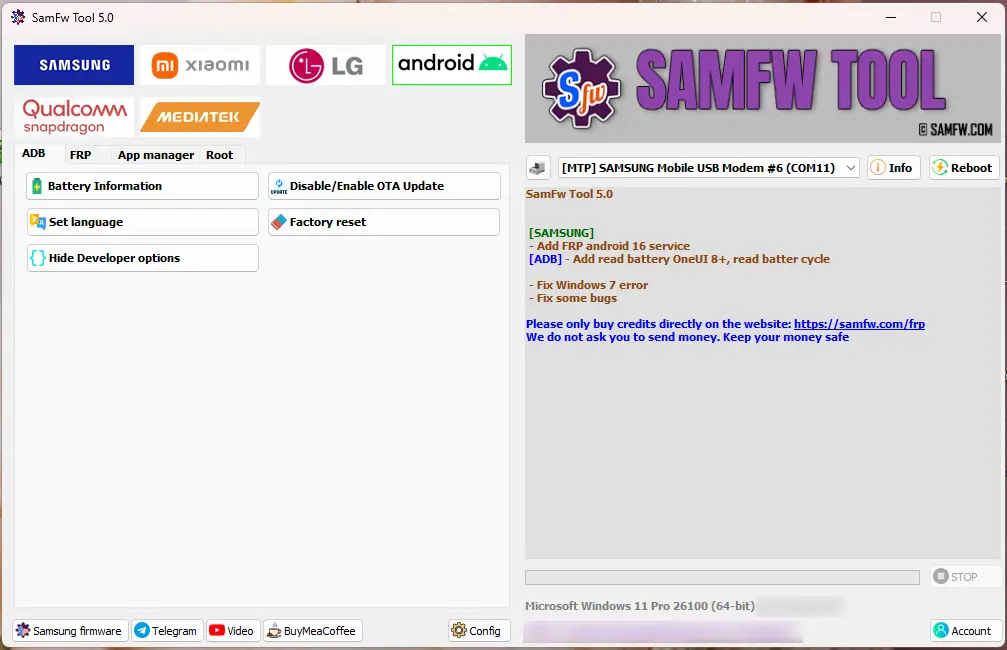
SamFw FRP Tool 5.3 comes with solid improvements and smoother performance. The tool now fully supports Android 16 FRP, making it ready for the newest Samsung devices. It also adds a useful feature to check battery health on OneUI 8+, helping technicians quickly diagnose device conditions.
This update fixes the Windows 7 issue and removes several small bugs, resulting in better speed, stability, and overall performance. With these enhancements, SamFw FRP Tool 5.0 remains a reliable and efficient solution for Samsung FRP bypass and device servicing.
What’s New in SamFw Tool 5.3
SAMSUNG
- Add FRP Android 16 service
- [ADB] – Add read battery OneUI 8+, read battery cycle
- Fix Windows 7 error
- Fix some bugs
- Optimize FRP Android 16
- Optimize FRP USA 2024
SamFw Tool 5.3 Features
Samsung
- Test mode (#0#)
- Remove FRP
- Remove FRP new security
- Factory reset
- Disable Knox
- Disable Factory mode
- MTP mode
- Enable secret code for Verizon
- ADB mode
- Change CSC
- Remove Samsung account
- Enable Toggle mobile data
- Change CSC root mode
- Download mode
- Exit Download mode
- Soft brick Fix
- FRP Android 5/6
- Odin Flash
- Save recent flash files
- Auto-detect file and select slot
- Auto-extract for ZIP file
- Ignore MD5 checksum
- Check Driver signature enforcement status
- Disable/Enable Driver signature enforcement
- Install Samsung USB driver
- Install VC++ 2015
Xiaomi
- ADB
- Bypass Micloud Android 8.1
- Enable Diag [ROOT]
- Fastboot
- Remove FRP
- Sideload
- Factory reset
- Reset MiCloud
- [QUALCOMM] Bypass Micloud clock (Anti relock)
- [QUALCOMM] Remove bypass Micloud clock (Anti relock)
- Read offline Micloud information
- EDL 9008
- Reset FRP
LG
- MTP
- Factory reset
- EDL (Support LG G7, G8, G8X, G8S, V30, V40, V50, V50S, Q6, G5, G6, V20, V35, V60)
- Remove FRP
- LG UP
- Flash LG KDZ
Android
- ADB
- Battery information
- Disable/Enable OTA Update
- Set language
- Factory reset
- Hide Developer options
- FRP
- Open Browser (FRP)
- APP Manager
- ROOT
Qualcomm
- EDL 9008 Partitions manager (Read/Write/Erase)
- EDL 9008 Reset FRP, Factory reset, Erase userdata
SamFw Tool 5.3 Download Link
Watch This Video for the Installation Guide 👇
Leave a Comment